
Ticket Tracker
Change status and severity
Lite and Premium
What you'll do
Set where a ticket stands with Status, and how urgent it is with Severity, which also sets when a response is due.
Steps
Change the status
- Select the ticket on the queue to open it.
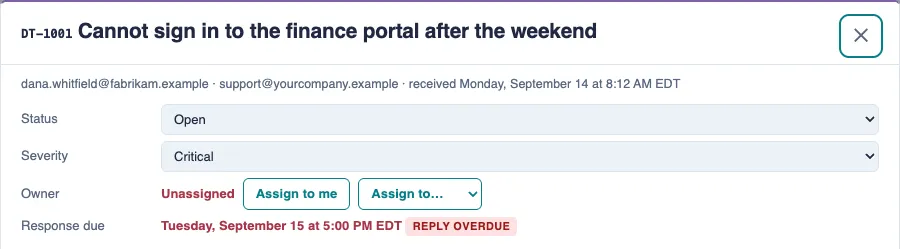
- Choose a new value in the Status list: New, Open, Waiting on requester or Resolved. The change saves as soon as you choose it.
Change the severity
- Open the ticket.
- Choose Critical, Degraded or Question in the Severity list. The change saves as soon as you choose it.
- Check the due date under Owner. It is worked out again from when the email first arrived, not from now.
Tips
- Set Waiting on requester after you ask the requester something. Their reply moves the ticket back to Open on its own.
- The list only offers the next steps that make sense. A ticket can't go back to New, and a Resolved ticket can only be reopened as Open.
- With the standard rule, a response is due within 1 business day for Critical, 2 for Degraded and 5 for Question. New tickets start at Question.
- Don't mark a ticket Resolved to make a due date go away. Set the right severity instead.
- Select Waiting above the queue to see every ticket waiting on a requester.