
Project Tracker
Start a project from a template
Lite and Premium
What you'll do
Create a new project that starts with a ready-made checklist of phases and tasks, then change it to fit.
Steps
Start from a business template
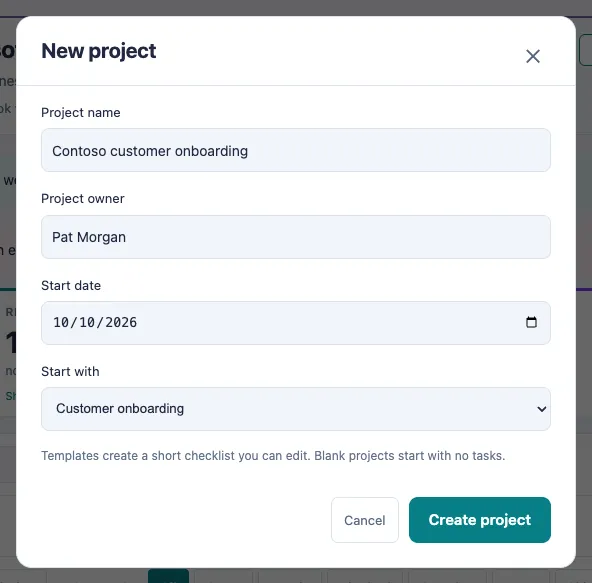
- Select + New project at the top of the page.
- Type the Project name.
- Check the Project owner. It starts with your name; change it if someone else runs the project.
- Choose a Start date if you want one.
- Under Start with, choose a template: Customer onboarding, Employee onboarding or Office move. Choose Blank project to start with no tasks.
- Select Create project. The new project opens with its phases and tasks ready to work on.
Fill in the project template
Use this when you already have your own plan and want every task in at once.
- Select Tools, then Project template.
- Leave New or existing project on New project and type the Project name.
- Add your phases under Phases, then one row per task under Tasks. Select More on a row to add the detail, what proves it done, and what it waits on.
- Select Check and read the preview. Nothing is written yet.
- Select Import to create the project.
To work in Excel instead, select Download the Excel template, fill it in, then select Choose a filled-in template…. It fills in the form for you to check and import.
Tips
- Each business template gives you three phases and five tasks. Every task starts as Not started, with the project owner as its owner.
- After the project is created, add tasks with + Add task, or open a task to edit it.
- If Start date is grayed out, your site's date fields are not set up yet. Ask your administrator.
- You need the Project Editor role to create a project. If you don't see + New project, ask your administrator.