
Project Tracker
Send a status report
Premium
What you'll do
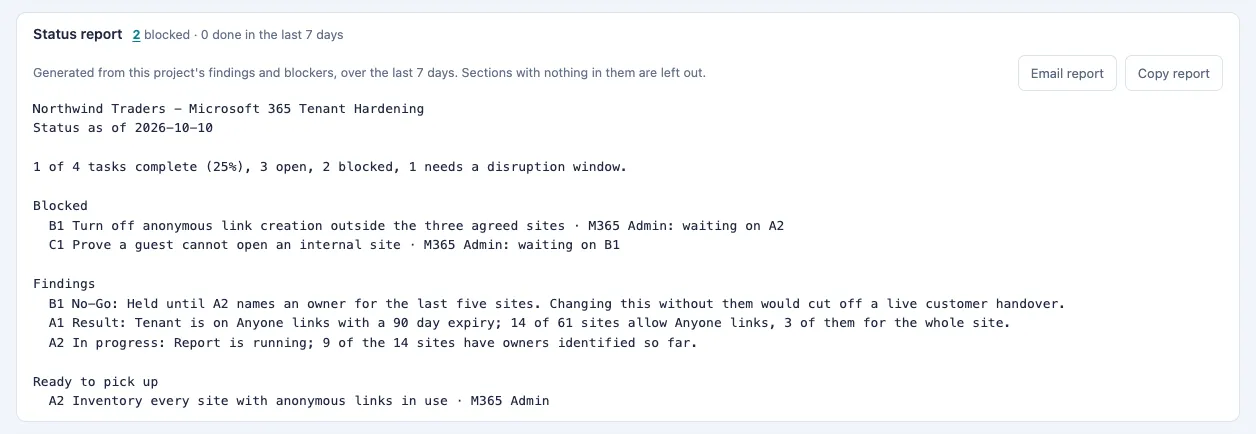
Copy or email a written status report for a project, generated from its findings and blockers.
Steps
- Open the project. The Status report section is near the top of the page, open by default.
- Read the report. It covers progress, what is blocked and why, recent findings, and what is ready to pick up, over the last 7 days. Sections with nothing in them are left out.
- Send it one of two ways: - Select Email report. A new email opens in your own mail program with the project and date as the subject and the report as the body. Add the recipients and send it from there. - Select Copy report, then paste the report into an email, chat or document.
Tips
- Nothing is sent from the app. Email report only opens a draft in your mail program.
- If the report is too long for an email link, it is copied for you instead. Paste it into the email that opens.
- Select a number on the report's summary line, such as the blocked count, to see the tasks behind it.
- The report is written from each task's findings and what blocks it, so keep those up to date for a better report.
- On Lite, Tools, then Copy status copies the project's task list instead.