
Agreement Tracker
Record an obligation
Lite and Premium
What you'll do
Record something an agreement commits you or the other party to, such as a report or a notice period, with its own due date and owner.
Steps
- On the Agreements tab, select the agreement to open it.
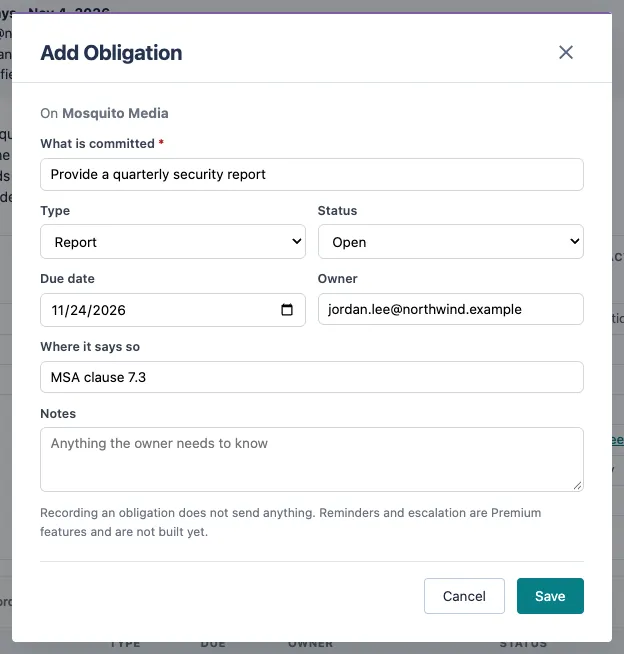
- Scroll to Obligations and select + Add obligation.
- Under What is committed, describe the obligation in one line.
- Choose the Type, such as Deliverable, Payment or Notice period.
- Enter the Due date and the Owner email address.
- In Where it says so, note the clause, for example MSA clause 7.3. Add anything else the owner needs to know in Notes.
- Select Save. The obligation appears in the agreement's Obligations list.
Tips
- When an obligation is done, select Edit beside it and change its Status to Met, Waived or Not applicable.
- Overdue and due-today obligations are labeled in the list, so they stand out when you open the agreement.
- Recording an obligation does not send anything to anyone.
- With Premium, the Obligations view under Review & follow-up shows what is overdue or due soon across every agreement, worst first.
- To delete an obligation, select Delete beside it and type DELETE to confirm.