
Agreement Tracker
Attach a document
Lite and Premium
What you'll do
Attach a file, such as a signed contract, SOW or invoice, to an agreement so everyone can open it from the register.
Steps
- On the Agreements tab, select the agreement to open it.
- Select 📎 Add Document.
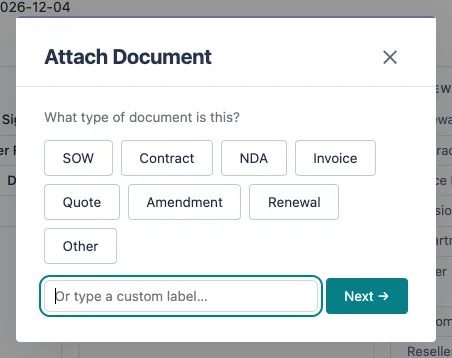
- Under What type of document is this?, select a type such as Contract, SOW or Invoice. To use your own label, type it in the box and select Next →.
- Choose the file from your computer.
- Wait for the message that the document is attached. A View button for it, such as View Contract ↗, now appears on the agreement.
Tips
- You can attach PDF, Word, Excel, CSV, email (.eml and .msg) and image files.
- Attach as many documents as you need. Several files with the same label are grouped under one button.
- To remove a document, select ✕ beside it. This removes the link from the agreement but does not delete the file from SharePoint.
- Archived agreements do not show 📎 Add Document. Unarchive the agreement first.
- Only people with the Agreement Editor role can attach or remove documents.